Public Snapshots
Public Snapshots allow you to share a read‑only version of your Gantt chart with anyone, even if they don’t have an Instagantt account. They’re designed to make project sharing simple, controlled, and reliable, while keeping your original project fully editable.
In project management, having a read‑only view is critical when you need to inform stakeholders without risking accidental changes. It helps teams communicate timelines, dependencies, and progress clearly, while preserving data integrity and ownership of the project plan.
This feature is especially useful for project reporting, stakeholder communication, and external visibility within structured gantt chart planning workflows.
🧭 Table of Contents
- What Are Public Snapshots?
- How to Create a Public Snapshot
- Direct Link vs Master Link
- Updating a Public Snapshot (Important)
- Using a Public Snapshot as a Baseline
- Using a Public Snapshot as a Project Template
- Best Practices for Using Public Snapshots
- Summary
- Frequently Asked Questions (FAQ)
🧠 What Are Public Snapshots?
A Public Snapshot is a static, read‑only copy of your Gantt chart that can be accessed through a public URL. Anyone with the link can view the snapshot in their browser, without logging in or having access to your Instagantt workspace.
Public Snapshots are ideal when you want to:
- Share project timelines with clients or stakeholders
- Present progress updates without granting edit access
- Publish a stable version of a project plan
- Communicate schedules clearly outside your team
They help extend the value of your gantt chart and gantt software beyond your internal workspace.
➕ How to Create a Public Snapshot
To create a Public Snapshot:
- Open your project in Instagantt
- Click Export & Share at the top of the chart
- Select Public Snapshots
- Choose one of the two options:Create Direct Link
- Create Master Link
Once you click your preferred option, the Public Snapshot will open in a new browser tab. You can then copy the URL directly from the browser’s address bar and share it.
The snapshot reflects the state of your project at the moment it’s created.
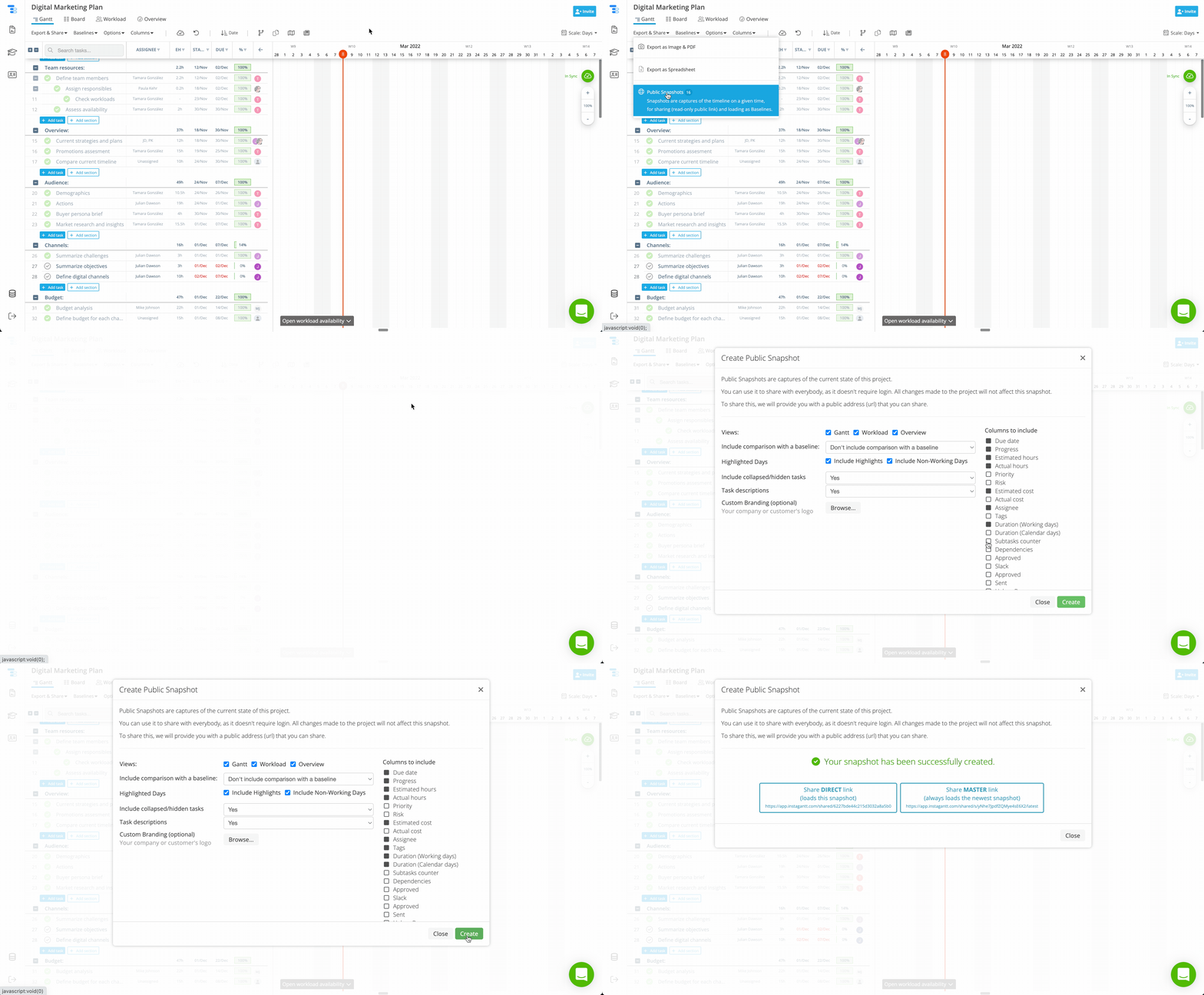
And just in case you'd like to check out how a Public Snapshot looks for the link holder, click here or try it out with your own project!
🔗 Direct Link vs Master Link
Instagantt offers two types of Public Snapshot links, each designed for different use cases.
Direct Link
The Direct Link always loads the snapshot in the state it was at the time it was created. A Direct link will remain the same at all times, it won't be updated in any way, so if updates a required, the user will need to create a new snapshot and share a new Direct link for that new snapshot.
Master Link
The Master Link always loads the most recent snapshot (the newest). The URL of the Master Link is static, so it won't ever change, but its contents will be updated when a new snapshot is created. The Master link can be shared only once, then the user will need to create new snapshots (without sharing the link) to update the contents of the snapshot. Then the link holder can simply refresh or reopen the Master Link to view the latest changes (for more details, continue to next section).
⚠️ Important: The Master Link is not live. It does not update automatically when your project changes.
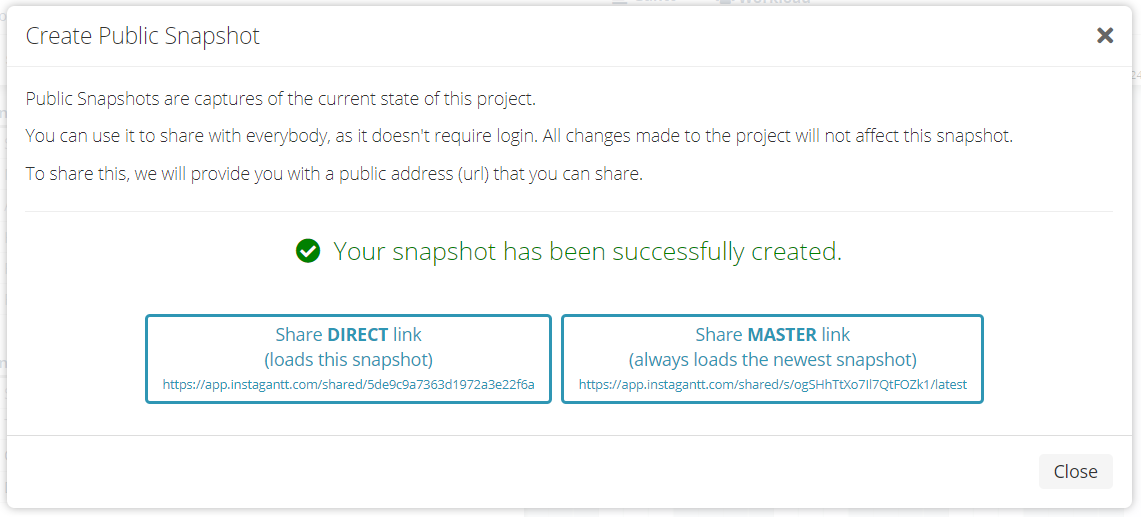
🔄 Updating a Master Link
This is where many users get confused, so it’s important to be very clear.
Public Snapshots — including those shared with a Master Link — are not live views of your project.
To update what people see when using a Master Link:
- Open your project
- Create a new Public Snapshot
- Choose Create Master Link again
When you do this:
- The URL stays exactly the same
- The content behind the link is updated to the new snapshot
- You do not need to re‑share the link
If you don’t create a new snapshot, viewers will continue to see the old version, even if your project has changed.
This manual update process ensures predictable, controlled project sharing and avoids accidental changes being published.
📊 Using a Public Snapshot as a Baseline
Public Snapshots can also be used as a visual baseline to compare your current project against a past version — without permanently converting the snapshot into an actual baseline.
To display a Public Snapshot as a baseline:
- Open your project
- Click Export & Share
- Select Public Snapshots
- In the list of available snapshots for the project, click Load as Baseline
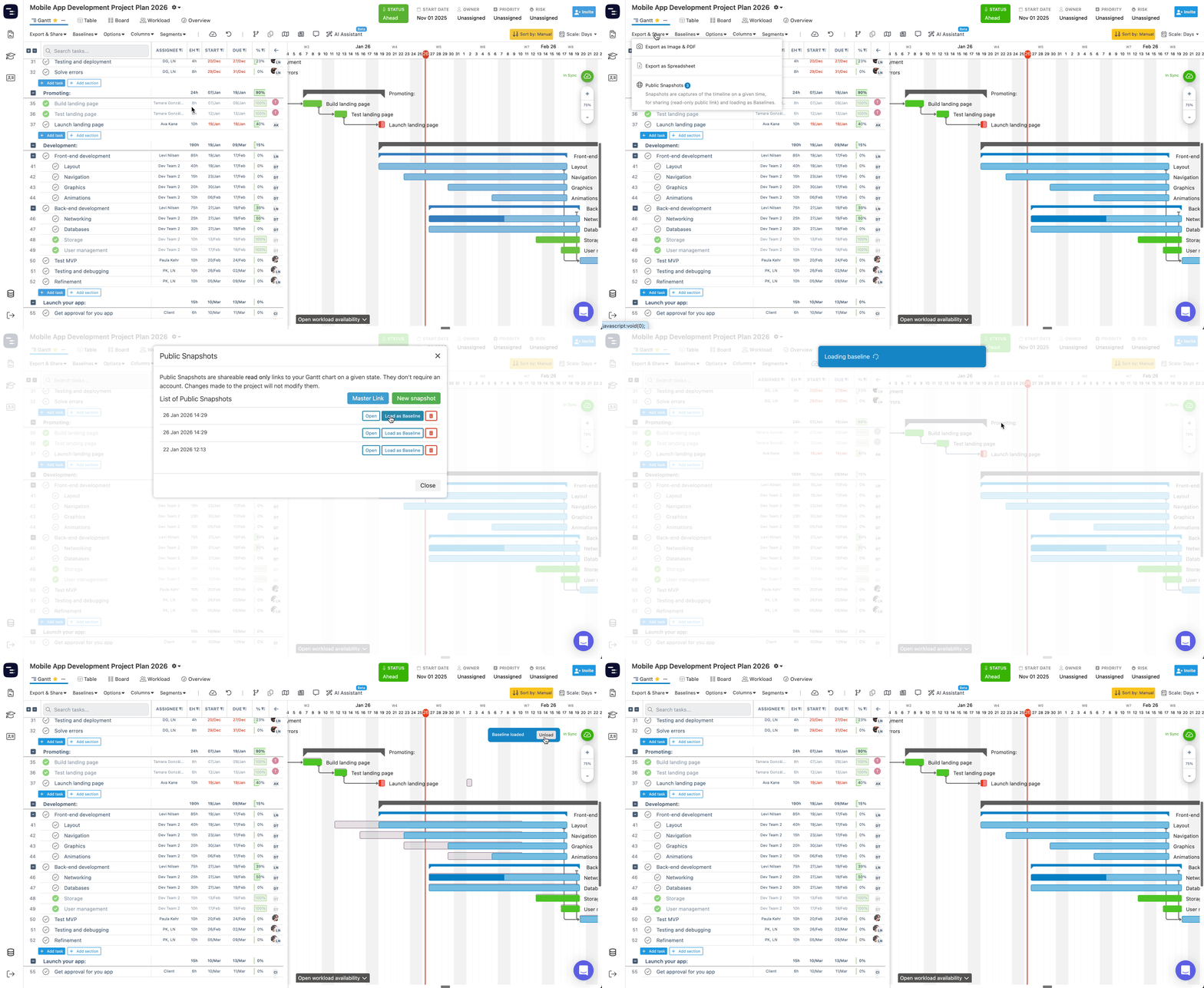
When loaded, the snapshot is displayed visually exactly like a baseline for comparison purposes. It does not become a saved baseline, and none of your existing baselines are modified or replaced. This makes it a safe, non‑destructive way to compare progress, review schedule deviations, or analyze changes against a previously shared or approved snapshot, while keeping your baseline configuration intact.
It complements standard baseline workflows by giving you a quick comparison tool directly inside your gantt chart.
🧩 Using a Public Snapshot as a Project Template
You can also use a Public Snapshot as the starting point for a new project, effectively treating it as a reusable template.
To create a new project from a Public Snapshot:
- Expand the left sidebar in Instagantt
- Click the + button
- Select the Clone from snapshot tab
- Paste the Public Snapshot link (Direct or Master Link)
- Click Continue
On the next step, you can either enter a new project start date to reschedule the plan forward, or enable Keep task status and dates as original to preserve the snapshot exactly as it is. Both Direct Links and Master Links can be used to clone a project.
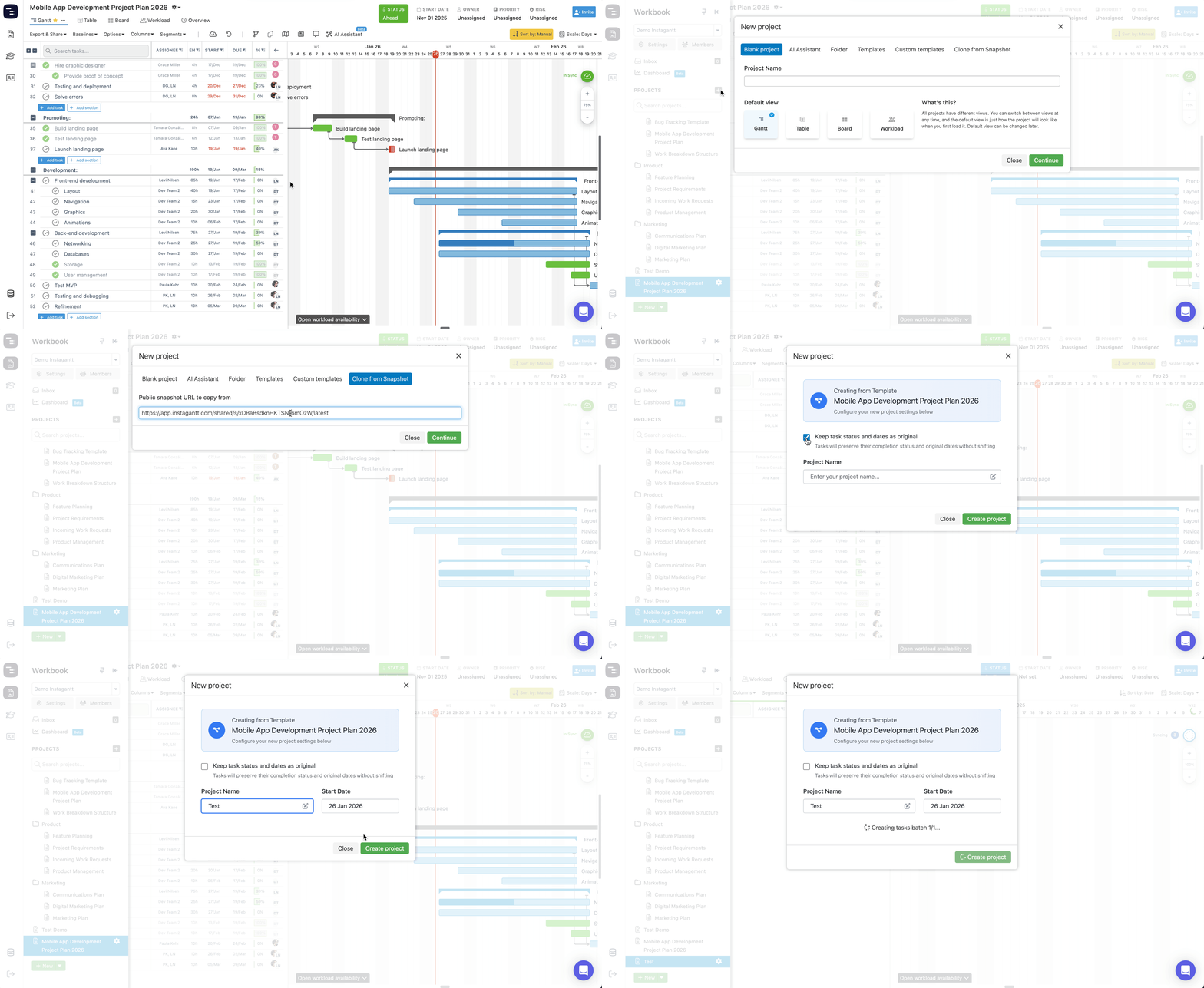
This approach is especially useful for reusing proven project structures, standardizing timelines across similar initiatives, and turning approved or shared plans into repeatable project templates.
💡 Best Practices for Using Public Snapshots
To get the most value from Public Snapshots:
- Use Direct Links for audits, approvals, or historical records
- Use Master Link for recurring status updates with clients or stakeholders
- Use Master Link to share read-only views with teammates who don't require editing access.
- Regenerate snapshots after major schedule or scope changes
- Add as much information as needed to tasks for context
Used correctly, Public Snapshots read-only views can become a powerful complement to your gantt chart software and overall project management process.
📌 Summary
Public Snapshots make it easy to share Gantt charts with anyone, without compromising control or edit access. By understanding the difference between Direct Links and Master Links — and remembering that snapshots are manual, not live — you can share project timelines confidently and clearly.
🚀 Share Your Gantt Charts with Confidence
Use Public Snapshots to publish clear, read‑only project timelines and keep stakeholders aligned — without giving up control of your project plan.
❓ Frequently Asked Questions (FAQ)
Do Public Snapshots update automatically?
No. All Public Snapshots are static. You must manually create a new snapshot to reflect changes, even when sharing a Master Link.
Is the Master Link a live view of my project?
No. The Master Link always shows the most recently created snapshot, not a live project.
Do viewers need an Instagantt account?
No. Anyone with the link can view a Public Snapshot in their browser without any need to authenticate or log in.
Can viewers edit the project through a Public Snapshot?
No. Public Snapshots are strictly read‑only, they can interact with it with Filters, collapsing/expanding tasks or sections and viewing task details panes, but those actions won't change the project's content in any way.