Automatic Project Scheduling
Automatic project scheduling is a fast and efficient way to build a complete project timeline using gantt chart planning logic, instead of manually assigning dates task by task. By combining dependencies and durations, Instagantt can calculate all task dates automatically from a single starting point, helping teams structure projects quickly and consistently.
This method is available in both Instagantt Standalone and Instagantt for Asana, with identical behavior in both versions.
🧭 Table of Contents
- What Is Automatic Project Scheduling?
- How Automatic Scheduling Works
- When to Use Automatic Scheduling
- Summary
- Frequently Asked Questions (FAQ)
🧠 What Is Automatic Project Scheduling?
Automatic project scheduling is a method for creating a full project timeline by defining task logic first, instead of dates. You start by setting:
- Task durations
- Dependencies between tasks
Once this logic is in place, Instagantt uses it to automatically calculate all task start and end dates when you assign a start date to the first task in the dependency chain.
This approach is especially useful in gantt chart software because it mirrors how real project schedules are built: tasks follow one another based on dependencies, not arbitrary dates.
⚙️ How Automatic Scheduling Works
Automatic scheduling in Instagantt follows a clear, structured flow:
- Create tasks without start or due dates
- Assign a duration to each task
- Connect tasks using dependencies
- Set the start date of the first task in the chain
Once that first date is set, Instagantt automatically schedules all subsequent tasks. Using this method:
- All dependencies are assumed to be Finish‑to‑Start
- Task dates are calculated based on durations, dependencies, working days, and hierarchy
- The entire chain is scheduled instantly, without manual adjustments
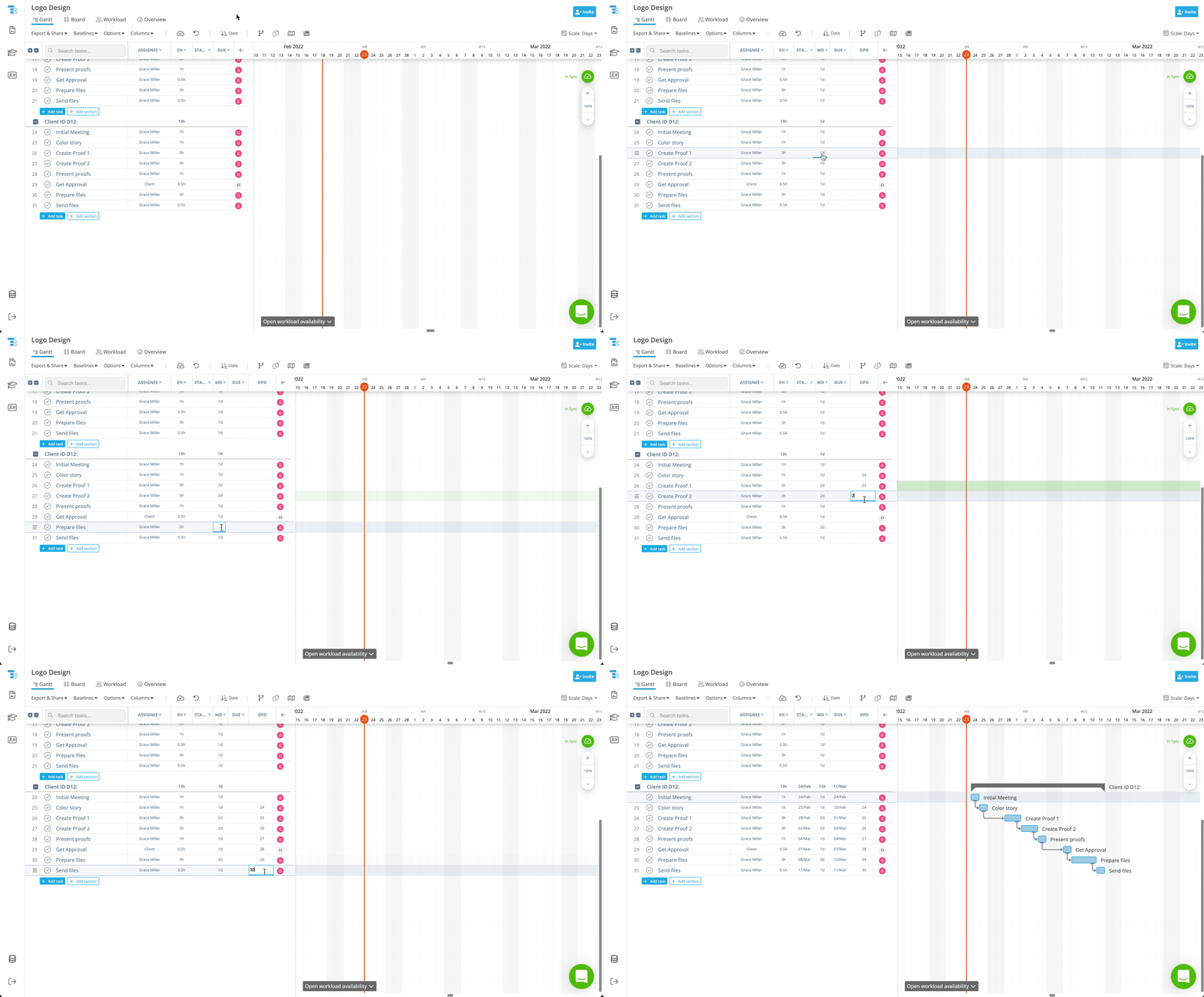
This is not a rescheduling feature. It is a one‑time scheduling method designed for projects that begin without dates and are built from logical relationships.
⏱️ When to Use Automatic Scheduling
Automatic scheduling is ideal when working with logic‑driven task chains, such as sequential workflows or process‑based projects.
It helps teams:
- Save time when building long dependency chains
- Avoid manual date entry task by task
- Maintain consistent scheduling logic
- Build more reliable gantt charts from the start
By relying on task logic instead of manual dates, teams can focus more on project management decisions and less on schedule maintenance, making this method a powerful accelerator for gantt software workflows.
📌 Summary
Automatic project scheduling in Instagantt allows teams to create complete, structured project timelines by combining durations and dependencies with a single start date. This logic‑first approach simplifies planning, reduces manual work, and supports faster, more accurate gantt chart planning.
Whether you’re working in Instagantt Standalone or Instagantt for Asana, this method helps you build schedules that reflect real project logic using modern gantt chart software.
🚀 Build Complete Project Timelines in Minutes
Add durations and dependencies, set one start date, and let Instagantt schedule the rest. Try automatic project scheduling on your next project and build a full timeline in seconds.
❓ Frequently Asked Questions (FAQ)
Is automatic scheduling a toggle or setting?
No. Automatic scheduling is a method, not a toggle. It works by defining durations and dependencies first, then assigning a start date to the first task.
Does automatic scheduling work if tasks already have dates?
No. This method is designed for tasks that start without dates. If tasks already have dates, they won’t be automatically recalculated.
Does it work in Instagantt for Asana?
Yes. Automatic project scheduling behaves the same way in Instagantt Standalone and Instagantt for Asana.
Does automatic scheduling respect working days and hierarchy?
Yes. Instagantt considers working days, dependencies, durations, and task hierarchy when calculating dates.