Dependencies
Establishing dependencies helps you control the order in which tasks happen, ensuring your project schedule stays accurate, predictable, and structurally sound. By defining how tasks relate to each other, you help Instagantt automatically manage the flow of your project — reducing manual work, preventing scheduling conflicts, and creating a timeline that adjusts intelligently when things change.
🧭 Table of Contents
- What Are Dependencies?
- How to Create Dependencies
- Dependency Types (F-S and S-S)
- Understanding Gaps (Slacks vs Lags)
- Managing Gaps Per Dependency (Standalone Only)
- How to Remove Dependencies
- Best Practices & Common Use Cases
- Summary
- Frequently Asked Questions (FAQ)
🧩 What Are Dependencies?
Dependencies define how tasks relate to each other and in what order they must occur. They’re a foundational tool in project management because they allow you to:
- Build logical workflows
- Identify bottlenecks and risks early
- Understand the critical path
- Ensure that changes propagate correctly across the timeline
In Instagantt, dependencies act as the backbone of a structured project plan. When one task moves, its successors automatically adjust, helping you maintain a clean and cohesive schedule without constant manual updates.
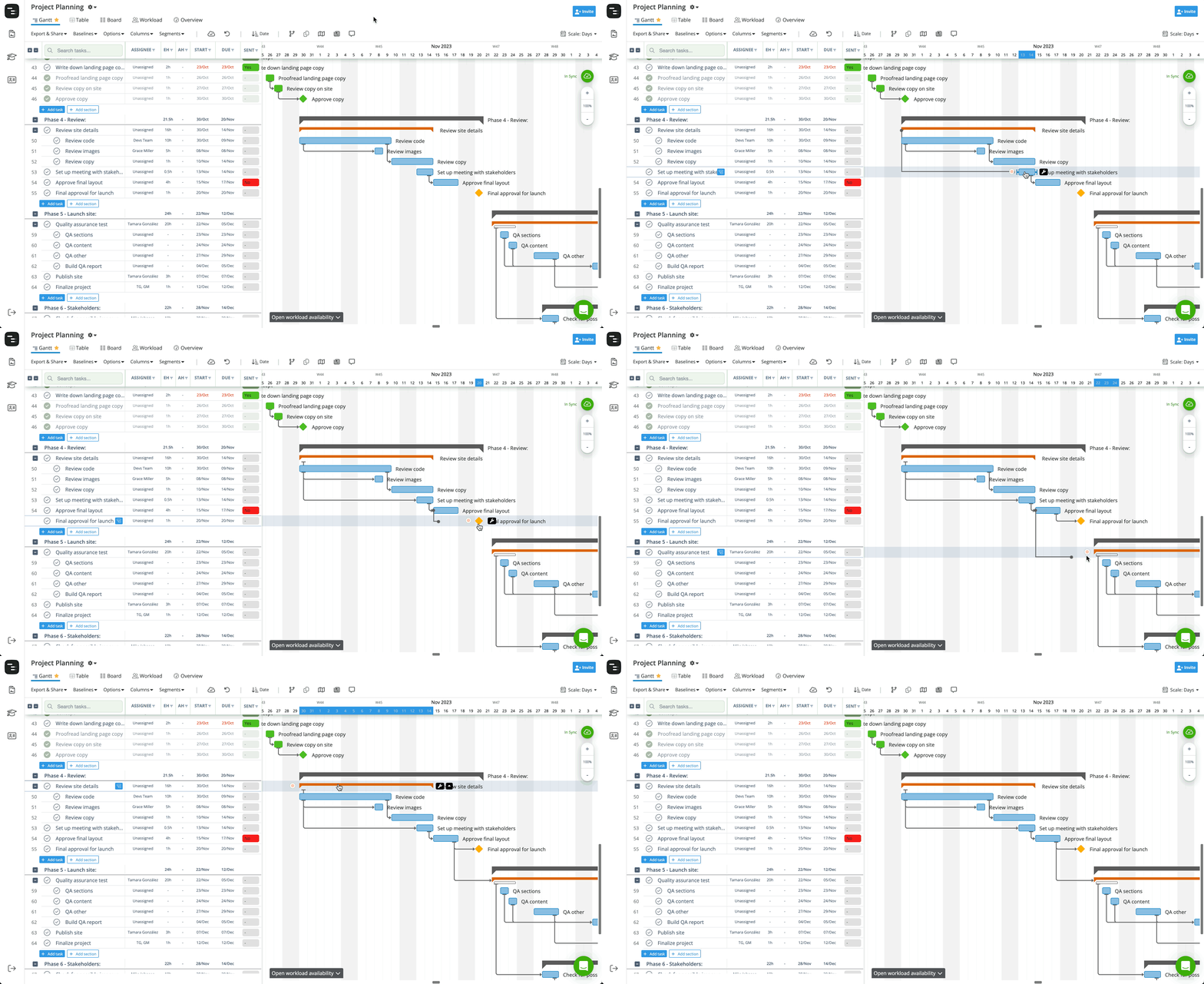
Instagantt also allows setting dependencies between task bars and parent-task brackets. This means a parent task can be connected to other tasks even if the parent doesn’t have fixed dates and depends on the dynamic timeline created by its subtasks.
However, dependencies cannot be created between a parent task and any of its own subtasks (or sub-subtasks and deeper levels). Parent–child structure already creates a natural dependency: moving a parent moves all its children.Subtasks that share the same parent (siblings), however, can be connected with dependencies.
This rule ensures clean, logical project structures while still giving you full flexibility in connecting related tasks.
🔗 How to Create Dependencies
Instagantt makes it easy to connect tasks visually or through structured data.
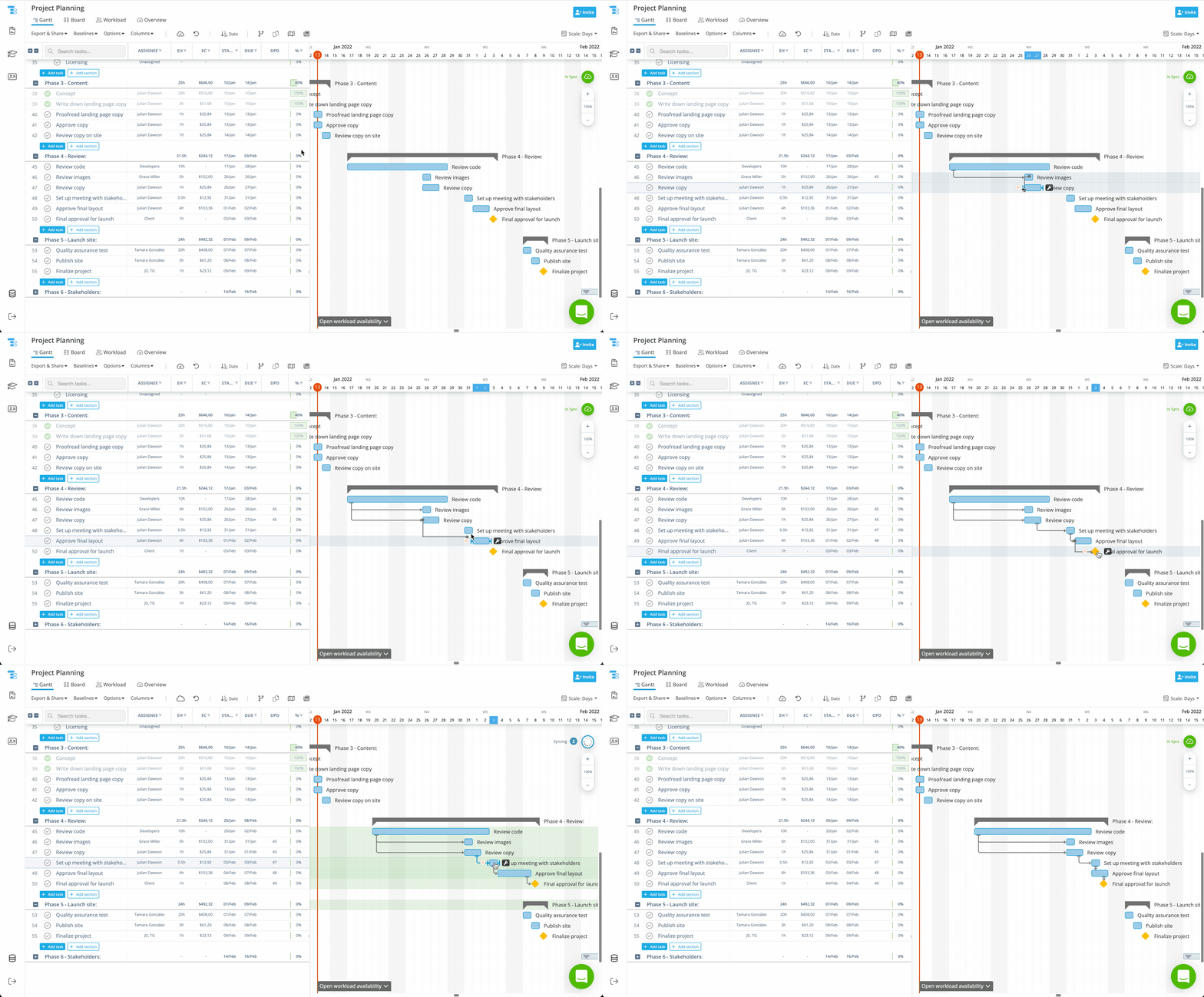
📍 Option A — From the Gantt Chart
- Hover over a task bar.
- Click one of the connection points (small orange dots).
- Drag to the successor task.
- Release to instantly create the dependency.
This method is ideal for visual planners who want to quickly map out workflows and validate their timeline structure at a glance.
Example: How to create dependencies on the Gantt chart
Example: How to create dependencies between brackets and regular tasks
📍 Option B — From the Task List (DPD Column)
- Locate the DPD column in the task list.
- Enter the row number of the predecessor task.
- Press Enter to confirm.
This approach is precise and efficient, especially for large or complex projects that require structured data entry.(Note: This method creates Finish-to-Start dependencies only.)
⛓️ Dependency Types (F-S and S-S)
Instagantt supports the two essential dependency types used in modern project planning:
- Finish-to-Start (FS) — The successor task can begin only after the predecessor ends.
- Start-to-Start (SS) — The successor task can begin only after the predecessor has begun.
These two types allow you to model nearly any real-world sequence, from linear workflows to parallel production phases, while maintaining clarity in your project timeline.
⏱️ Understanding Gaps (Slacks vs Lags)
Gaps let you fine-tune the timing between dependent tasks:
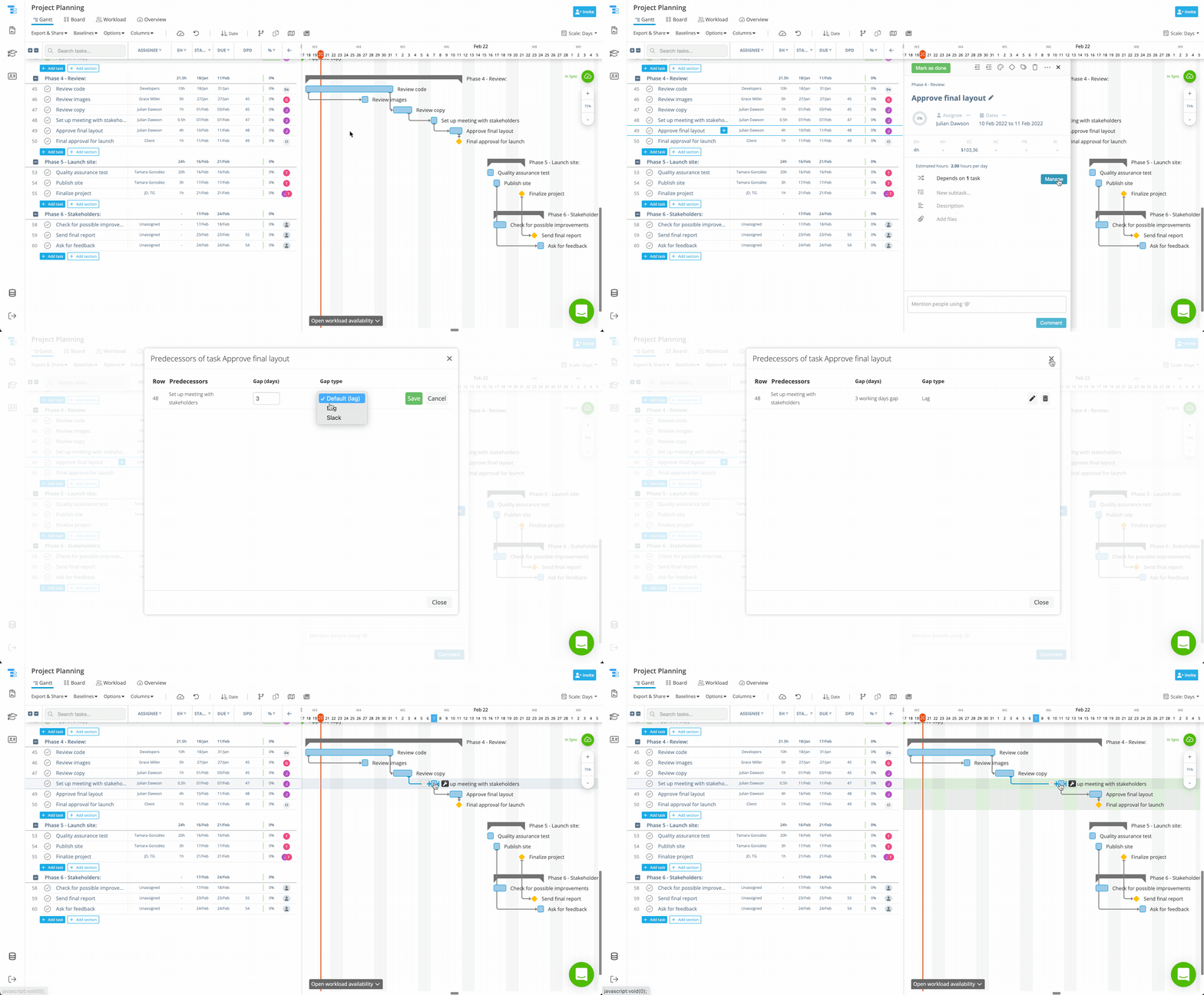
- Lag: fixed gap that remains the same even if a predecessor task is rescheduled.
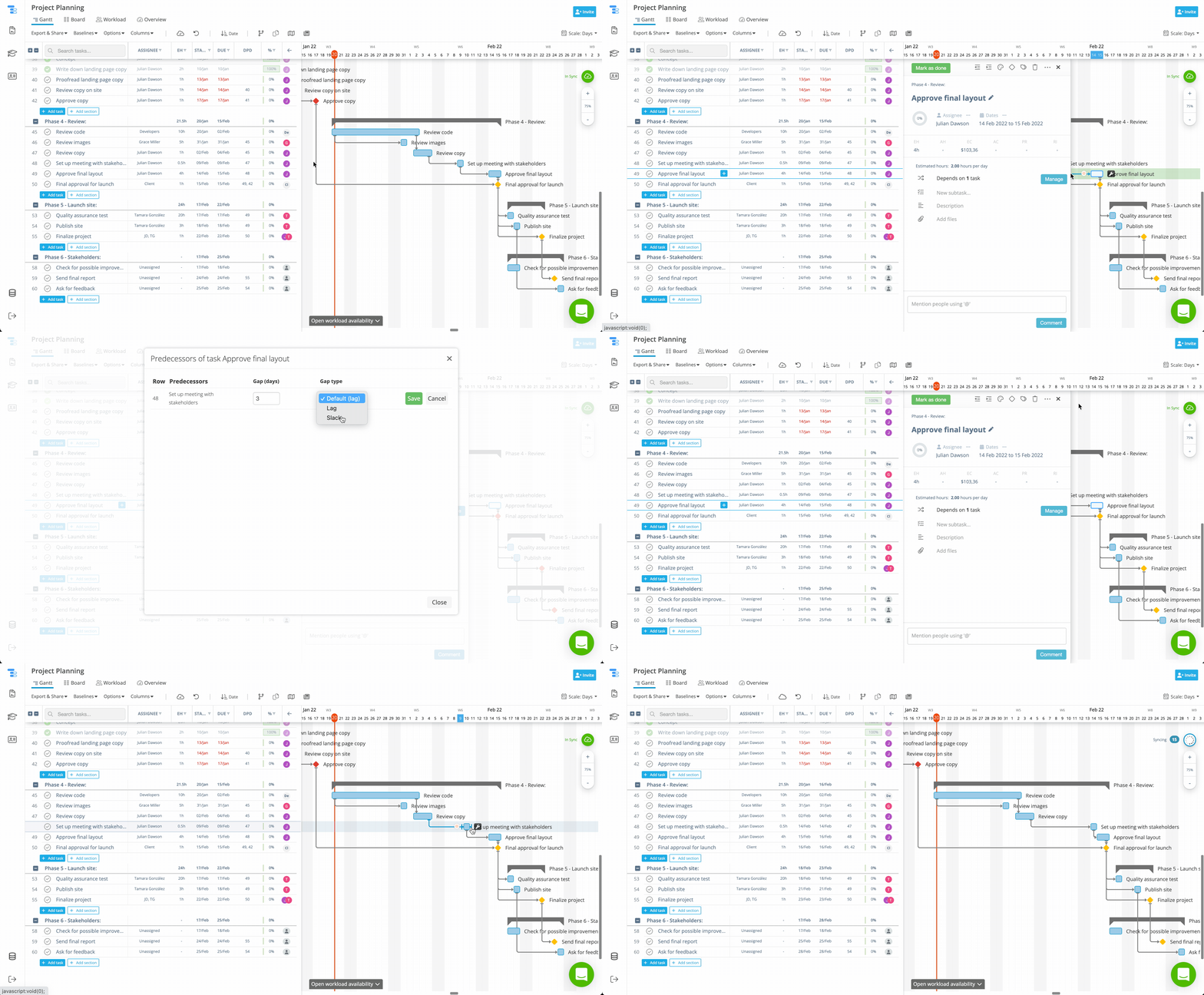
- Slack: flexible gap that allows the time between tasks to be expanded or reduced when a predecessor is rescheduled.
Gaps are especially useful when your workflow includes handoff delays, approval cycles, waiting periods, or overlapping workstreams. By controlling gaps, you create a more accurate and reliable Gantt chart.
Instagantt also includes a global setting for gaps, “Keep lag between dependencies when dragging.”, available on the Options menu.When enabled:
- Dragging tasks preserves the gap as lag, keeping spacing consistent.
When disabled:
- Gaps behave as slacks, allowing flexible compression when moving tasks.
Instagantt gives you simple but powerful tools to manage gap behavior through global or individual settings.
Example of Lag gap type:
Example of Slack gap type:
⚙️ Managing Gaps Per Dependency (Standalone Only)
Standalone users get more granular control for individual dependencies:
- Click the successor task in the task list.
- Open the Task Details Pane.
- Click Manage under the Dependencies section.
- View all predecessor relationships.
- Adjust:Gap value (days)
- Gap type (lead or lag)
This lets you model real-world delays, staggered starts, and multi-team workflows with precision.
⚠️ Note for Asana users: Only the global gap setting "Keep lag between dependencies when dragging" is available, which can be found on the Options menu.
❌ How to Remove Dependencies
Removing dependencies is simple:
📍 Option A — From the Task List
- Delete the predecessor number in the DPD column.
- The dependency is removed instantly.
📍 Option B — From the Gantt Chart
- Hover over the task bar.
- Click the wrench icon.
- Select Unlink from predecessor.
Perfect when you need to visually rethink or break a connection.
💡 Best Practices & Common Use Cases
To get the most value from dependencies:
- Use FS for sequential steps (e.g., design → development → testing).
- Use SS for parallel work (e.g., UX research + visual design).
- Add lags to represent natural delays (shipping, approvals).
- Use leads/slacks for overlapping work.
- Connect all related tasks to the last task of the project to get a rich Critical Path.
- Regularly review and clean up your dependency chains.
When used properly, dependencies transform your Gantt chart into a dynamic scheduling engine, not just a static timeline.
📌 Summary
Dependencies are one of the most powerful planning tools in Instagantt. They create structure, enforce logical task order, and keep your project timeline accurate even as things evolve.
Whether you work visually from the Gantt chart or through the task list, Instagantt makes it effortless to build, adjust, and maintain task relationships.
🚀 Build Clearer Timelines With Powerful Task Dependencies
Leverage Instagantt’s intuitive dependency tools to build smarter schedules, minimize delays, and keep your entire project aligned from start to finish.
👉 Try it today in instagantt.com
❓ Frequently Asked Questions (FAQ)
Do dependencies update automatically when tasks move?
Yes — moving a task dynamically updates all connected successors based on their dependency rules.
Can Asana users edit gaps individually?
No — Asana users only have access to the global gap setting.
Can I create dependencies using the task list?
Yes — entering a predecessor number in the DPD column creates the dependency instantly.
How do I delete a dependency?
Either delete the number in the DPD column or select Unlink from predecessor using the wrench icon on the Gantt chart.
What does “Keep lag between dependencies when dragging” do?
It controls whether gaps between dependencies behave as lags (fixed spacing) or slacks (flexible overlap) when tasks are moved on the timeline.