Estimated Cost
Estimated Cost in Instagantt allows you to plan, track, and control project budgets directly inside your Gantt chart, helping teams make informed decisions before costs escalate. By combining estimated hours, hourly rates, and fixed costs, Estimated Cost gives you a reliable financial view of your project—fully integrated into your project timeline.
Whether you’re managing budgets in Instagantt Standalone or syncing costs with Asana, Estimated Cost is a key tool for cost control, forecasting, and professional project management.
🧭 Table of Contents
- What Is Estimated Cost?
- How Estimated Cost Is Calculated
- Where Estimated Cost Is Available
- Project-Level Cost Visibility
- Comparing Estimated Cost vs Actual Cost
- Estimated Cost in Instagantt for Asana
- Use Cases for Better Budget Control
- Summary
- Frequently Asked Questions (FAQ)
💡 What Is Estimated Cost?
Estimated Cost (EC) represents the planned financial cost of completing a task, section, or entire project. It is a core component of project budgeting and online Gantt planning, allowing teams to forecast expenses before work begins.
Estimated Cost helps you:
- Plan budgets with confidence
- Understand financial impact early
- Align scope, time, and cost
- Adjust plans proactively instead of reacting too late
In Instagantt Standalone, Estimated Cost is a default column.In Instagantt for Asana, it behaves as a custom field and syncs accordingly.
📍 Where Estimated Cost Is Available
Estimated Cost is available in multiple places across the platform:
- As a column in the Gantt View (Task list)
- Inside the Task Details Pane
- Aggregated automatically at:Section level
- Project level
The field supports decimal values and is independent from progress, while still driving cost calculations.
🧮 How Estimated Cost Is Calculated
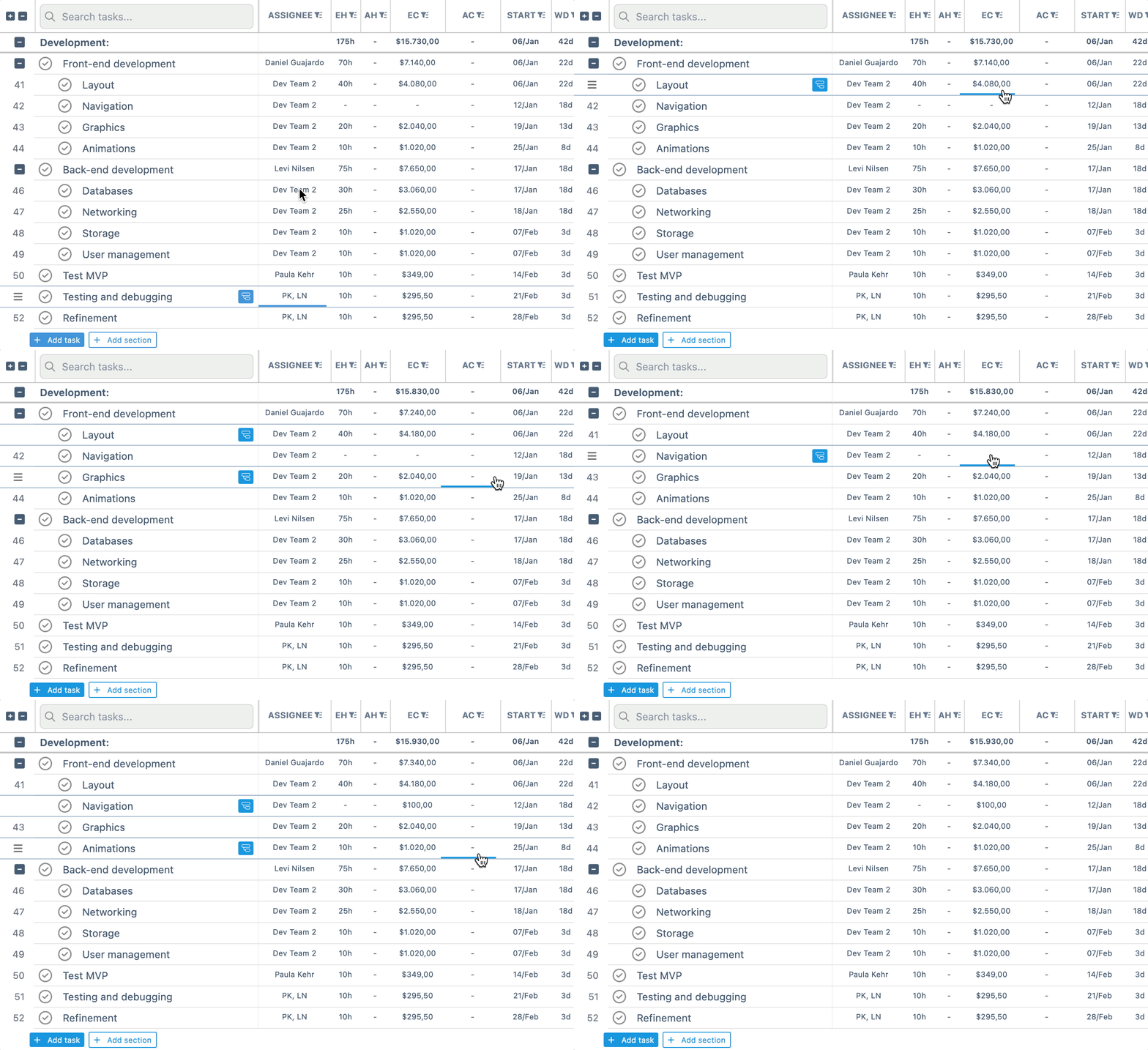
Estimated Cost is calculated by combining variable costs and fixed costs:
- Variable cost = Estimated Hours × Hourly Rate per Member
- Fixed cost = Manually entered directly in the Estimated Cost column
Instagantt automatically sums both values to calculate the final Estimated Cost for each task.
This approach mirrors real-world project cost management, where labor-based costs and fixed expenses coexist. It also creates a strong connection between effort planning, resource allocation, and budget forecasting in your Gantt chart software.
⚙️ Estimated Cost
To add Estimated Cost to your project, simply enable the Estimated Cost column on the Columns menu.
When there are no Estimated Hours (EH) for tasks, the Estimated Cost column will only display fixed costs. The system will automatically calculate variable costs when both EH and Hourly rates are added to the project.
💵 Hourly Rates per Member
To calculate variable costs accurately, Instagantt uses Hourly Rates per Member.
To configure hourly rates:
- Open the Options menu at the top of the screen
- Click Hourly Rates per Member
- Assign:Hourly rate
- Capacity per member
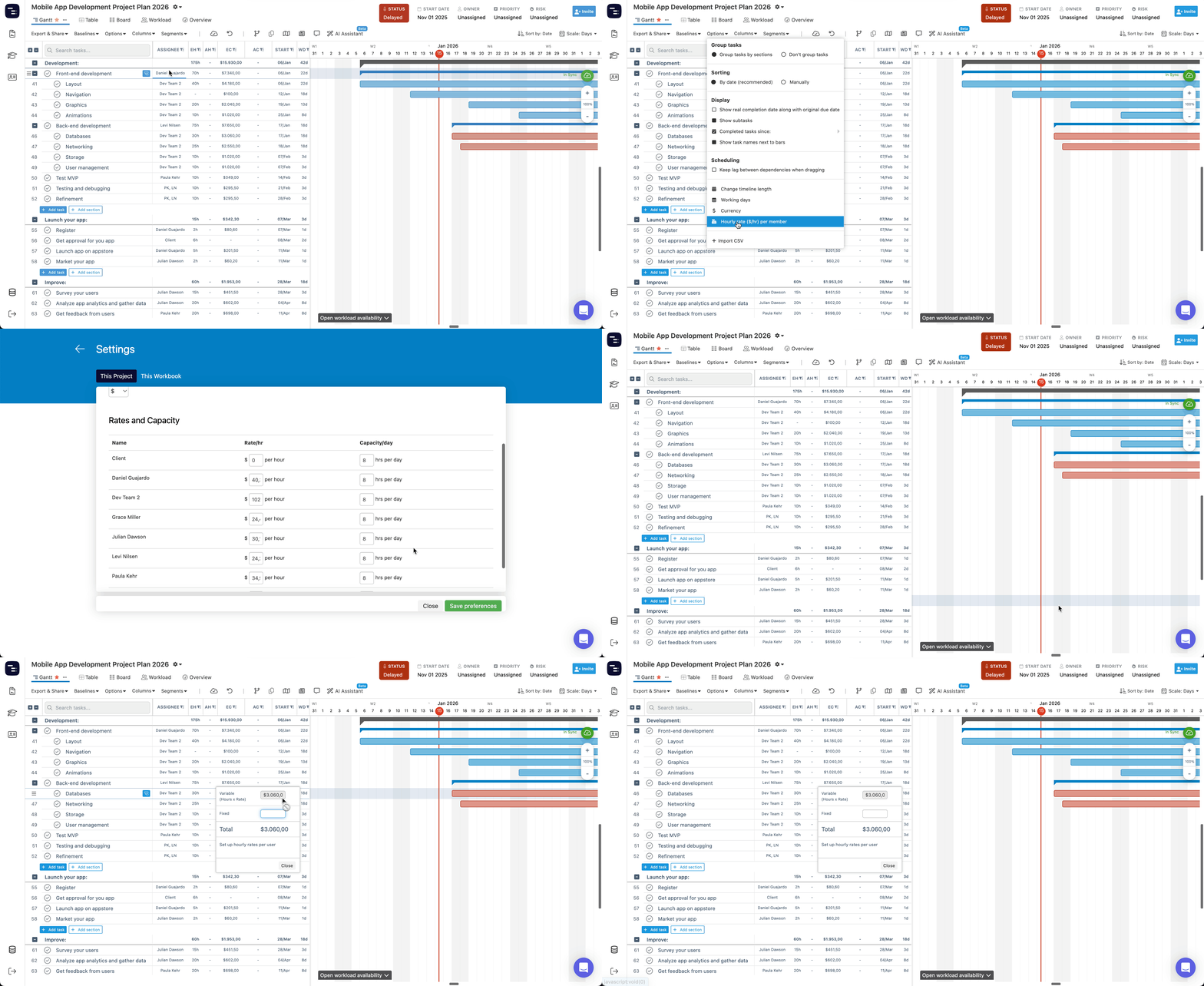
⚠️ If a member doesn’t appear, it’s because they don’t have any tasks assigned in that project.
📊 Project-Level Cost Visibility
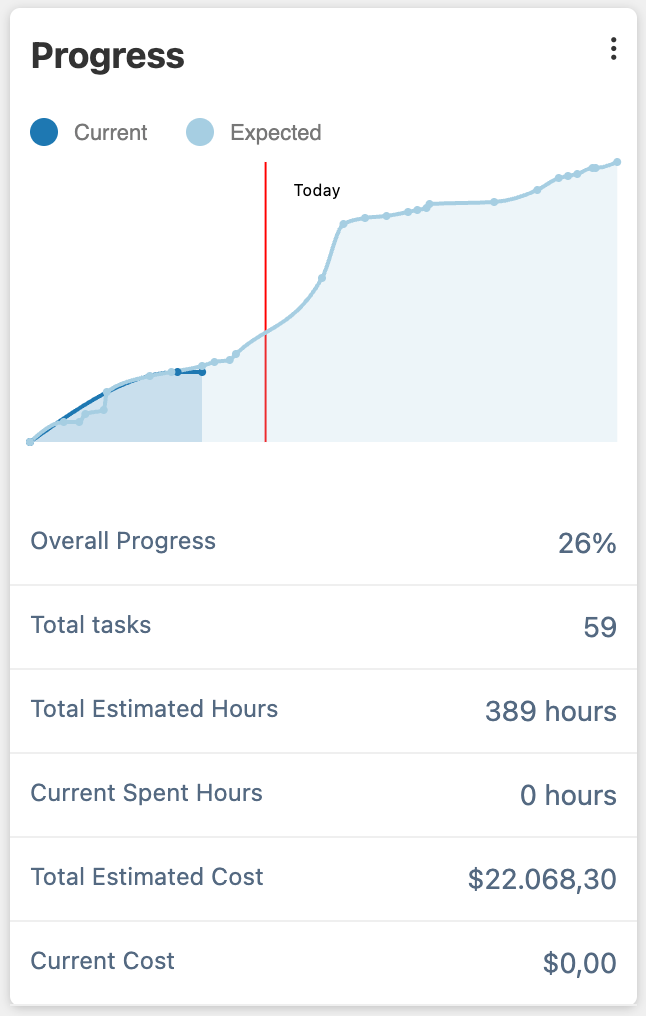
Instagantt automatically summarizes Estimated Cost across your project:
- Dashboard (left sidebar): high-level cost insights
- Overview (top navigation):Displayed under the progress graph
- Labeled as Total Estimated Cost
This allows project managers to track financial health without exporting data or using external tools.
🔍 Comparing Estimated Cost vs Actual Cost
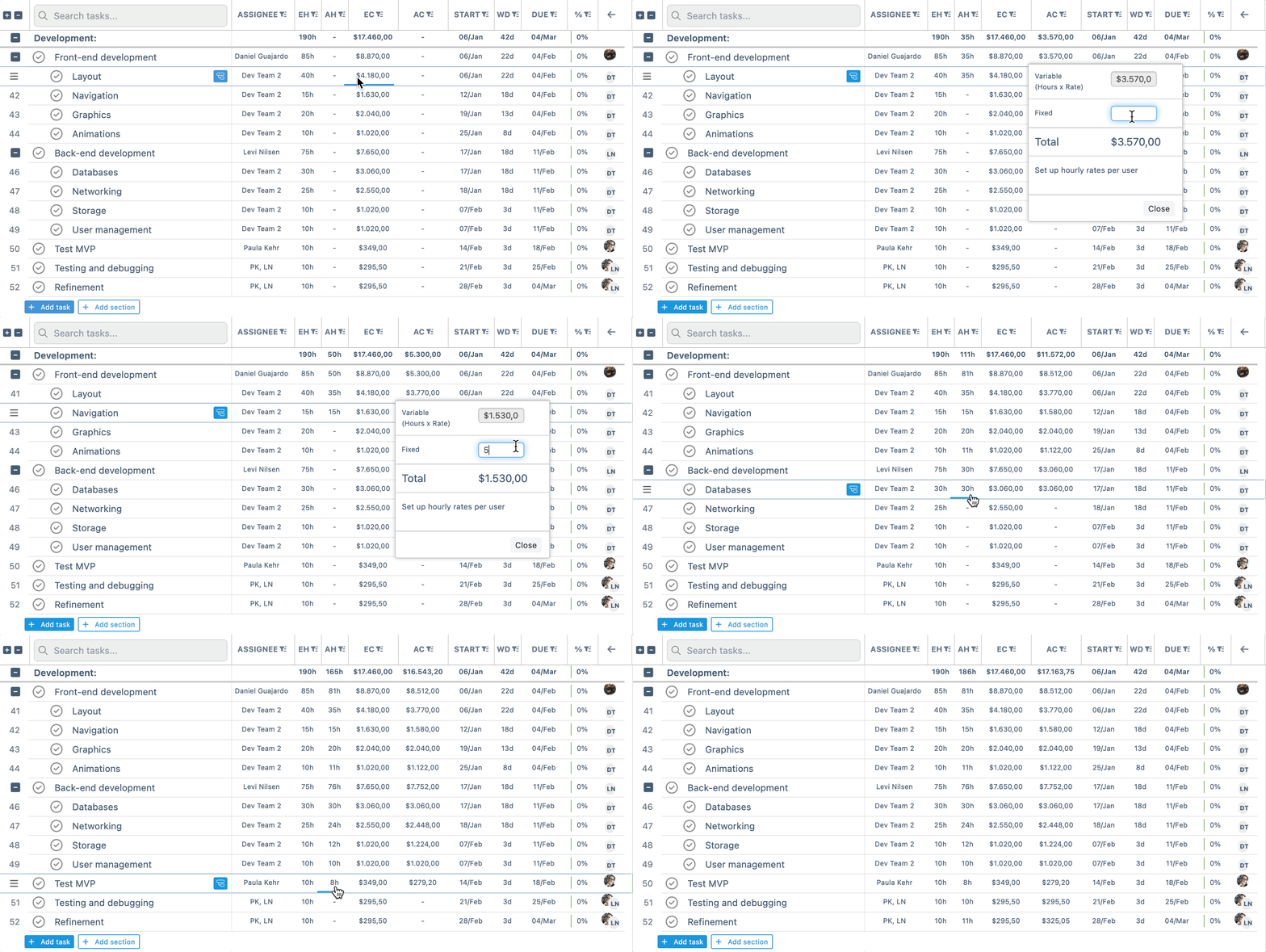
Estimated Cost can be compared directly with Actual Cost, enabling effective budget control.
- Estimated Cost:Based on estimated hours logged in theEstimated Hours column
- Used for planning and forecasting
- Based on actual hours logged in the Actual Hours column
- Reflects real execution costs
- Actual Cost appears as Current Cost in Overview
This comparison helps teams identify overruns early and adjust scope, timelines, or resources accordingly.
🔄 Estimated Cost in Instagantt for Asana
In Instagantt for Asana, Estimated Cost syncs using the same logic as Estimated Hours:
- Estimated Cost syncs with an Asana custom field
- Changes flow both ways
This guarantees financial data consistency across both platforms.
🎯 Use Cases for Better Budget Control
Estimated Cost is especially useful for:
- Budget forecasting during project planning
- Comparing planned vs real costs
- Monitoring financial impact of scope changes
- Managing client budgets and internal costs
- Supporting data-driven decisions in Gantt chart planning
By integrating cost directly into your online Gantt chart, Instagantt turns timelines into a complete project management and budgeting system.
📌 Summary
Estimated Cost in Instagantt brings financial visibility into your project timeline. By combining estimated hours, hourly rates, and fixed costs, you gain a clear and actionable view of project budgets—helping you plan smarter, control spending, and adjust proactively as projects evolve.
🚀 Plan smarter projects with built-in cost control
Use Estimated Cost in Instagantt to align timelines, resources, and budgets in one powerful Gantt chart software—and keep your projects financially on track from start to finish.
❓ Frequently Asked Questions (FAQ)
What is the difference between Estimated Cost and Actual Cost?
Estimated Cost is based on planned effort and rates, while Actual Cost reflects real hours logged and real expenses.
Does Estimated Cost affect task progress?
No. Estimated Cost is independent from progress and completion percentage.
Can I enter fixed costs manually?
Yes. Fixed costs can be typed directly into the Estimated Cost column.
Does Estimated Cost work with workloads?
Indirectly, yes. Workloads use Estimated Hours, which drive variable cost calculations.
Is Estimated Cost available in Instagantt for Asana?
Yes. It syncs as a custom field for paid Asana users.